

Frequently Asked Questions About the ZEN12 Motion Dimmer
Find the answers to your questions quickly by searching key words!
-
Press the CTRL and F keys at the same time on your keyboard. A little box should pop up in your browser window.
-
Type in a key word in your question like "hub" or "compatible". You should see your key word highlighted every time it is mentioned on the page.
-
Use the arrow keys in the search box to jump to each instance that your key word is mentioned.
INSTALLATION QUESTIONS
Will multiple ZEN12's fit next to each other in a double / triple gang switch box?
-
Yes. Each set up is different so we're unable to verify 100% without being on site, but Zooz switches are a similar size to other electronic Z-Wave switches on the market. Most users report no issues fitting two or three Zooz switches side by side. The ZEN12 , like other Zooz switches, was also designed to be slimmer to fit in crowded or shallow switch boxes.
-
ZEN12 Dimensions: 1.25" deep, 1.75" wide, 2.75" tall
Can the ZEN12 be used in 12-24V or 240V installations?
-
No. The ZEN12 is rated for 120 VAC, 60 Hz and cannot be connected to a transformer supplied fixture or be used in a low voltage installation. Please make sure to review the provided manual thoroughly, including the Caution section, before installing your ZEN12.
Is the ZEN12 CSA approved?
-
While Zooz devices don't have any Canada-specific certifications, our devices are ETL-certified and are fully compliant with North American safety standards.
Can the ZEN12 be installed outdoors?
-
The ZEN12 is rated for indoor use only.
Which wall plates and regular on/off switches do you recommend so that they match my ZEN12?
-
We recommend the Leviton white wall plates and Leviton white on / off switches, both usually available in most hardware stores. Our switches don't need additional add-on switches for 3-or more-way locations and have to be wired to mechanical on/off 3-way switches at the other end of the installation.
-
You can find other accessory and installation recommendations here: Recommended Accessories for Your ZEN12 Motion Dimmer
How do I install the ZEN12 Motion Dimmer?
-
Your ZEN12 comes with a manual containing the most common single pole or 3-way wiring set-ups. It is very important to use the correct wiring manual for the appropriate Zooz model as certain models wire differently than others.
How Can I Identify the Wiring For My Zooz Switches?
-
Your ZEN12 comes with lifetime tech support and we're happy to help identify the wiring in your set-up and provide custom wiring instructions, free of charge. Please review the requirements in this article before submitting your images and wiring diagram request to Zooz support.
How many ZEN12's do I need for a multi-pole (3-way/4-way) installation? Do I need to buy some kind of add-on switch?
-
Zooz switches are designed to be used with regular 3-way on/off switches. This means for a 3-way (2 switches controlling the same light) or a 4-way (3 switches controlling the same light) you only need to buy 1 ZEN12.
-
The regular on/off switches cannot have any kind of LED indicator or illuminated paddle on them. If your existing set-up uses some kind of add-on switch for a previous smart switch from another brand, you will need to remove the add-on switch and replace it with a regular on/off switch. More about that here: Can My Zooz Switch Be Used with Add-Ons, Dimmers, or Another Z-Wave Switch?
What if I want all of my switches to look the same or have smart control from every wall switch in my smart home?
Can I use the ZEN12 to control something other than lights?
-
Fan Control: NO: Can I Use My Zooz Light Switch With a Fan?
-
Outlet/Receptacle Control: NO: Can I Use My Zooz Light Switch with a Switched Receptacle?
-
Tube/Ballast Lights: NO: Can My Zooz Light Switches Be Used with Tube Lights?
-
Add-On Switches or Dimmers: NO: Can My Zooz Switch Be Used with Add-Ons, Dimmers, or Another Z-Wave Switch?
I've used a Zooz dimmer/switch with some of the above before - why can't I use it now?
-
If you've previously used an older model of Zooz dimmer/switch without issue, then consider it a lucky unit. Zooz switches/dimmers are smart devices with special electronics that need to be connected to appropriate loads. Otherwise, the electronic components can be damaged by the load either immediately or over time. Please do not connect the ZEN12 to anything other than the approved loads under its maximum rating.
Which LED Bulbs Can I Use with My Zooz Switches and Dimmers?
-
Not all LED bulbs will work seamlessly with all Z-Wave switches. We no longer publish a database of verified working LED bulbs (manufacturers change components way too often for that), so here are some general tips that we hope will help you make the best choice for your smart lighting.
Can I connect my ZEN12 to halogen bulbs?
-
NO. Halogen bulbs, similar to tube lights, produce high inrush current that could damage the dimmer, so we don't recommend using any of our Zooz switches in locations with halogen bulbs. Even if the wattage is rated at or under the ZEN12's maximum rating, halogens can draw over 40 times more than the listed rating. The ZEN12 should only be used with LED/CFL or incandescent bulbs within its maximum rating.
Can I use smart bulbs with the ZEN12?
-
Yes. The ZEN12, like other Zooz switches, has a special Smart Bulb Mode setting, which disables the manual and/or Z-Wave control. This is important because otherwise you would be cutting power to the smart bulbs and not be able to control them wirelessly / remotely, as well as risk damage to the ZEN12 as smart bulbs cannot be dimmed electrically by a smart dimmer.
Can I use my ZEN12 without a load connected?
-
Yes. The ZEN12 will then act as a true remote / scene controller - you'll need to add it to your Z-Wave hub, and program scenes or automations that will be triggered by the number of taps on each of the buttons.
My electrical installation is 20A, based in the USA with 12AWG wires. Can I install the ZEN12?
-
If your existing circuit is protected by a 20A breaker and uses 12 AWG wiring, the NEC-compliant solution is to have the circuit evaluated by a qualified electrician and, if appropriate for the circuit, replace the 20A breaker with a 15A breaker. Once the circuit is protected by a 15A breaker, a WAGO connector can be used to transition from the existing 12 AWG wiring to 14 AWG wiring for connection to the Zooz device.
-
Some customers have installed Zooz devices on 20A circuits using a short 14 AWG pigtail from the existing 12 AWG wiring, particularly when the connected load is well within the device ratings. However, this installation method is not one we can officially recommend because it does not meet NEC requirements for a 14 AWG conductor on a 20A branch circuit.
-
For safety and code compliance, we recommend following the first option or consulting a licensed electrician to determine the best solution for your specific circuit.
What is the warranty coverage for the ZEN12?
-
Zooz 700 and 800 series devices are covered by a 5-year warranty. Please register your device here and review the full warranty policy here.
Where can I find the device manual for the ZEN12?
UNIQUE SET-UP QUESTIONS
Can the ZEN12 be operated in a switched Neutral configuration?
-
NO. Zooz switches need both power and neutral from the same source available in the box to work properly. Any other installation/scenario will damage the equipment. Switched neutral is also not up to code so we recommend having the installation wired per the requirements of the NEC for your own safety.
POWER OUTAGE QUESTIONS
Is it common for the ZEN12 to malfunction or stop working after a power outage?
-
No. Power outages can sometimes damage the electronics inside the switch, even if it was connected to an appropriate load. The sudden inrush current when power is restored damages the electronics and there is nothing that can be done on the device hardware side to help prevent that unfortunately. We recommend a whole house surge protector.
PRODUCT FUNCTIONALITY QUESTIONS
How does the dimmer on the ZEN12 work?
-
If you click the large button once when the ZEN12 is off, it will turn on to max brightness or custom brightness (per the parameters). To adjust brightness up, press the bottom right button. To adjust brightness down, press the bottom left button. To turn the ZEN12 off, press the large button once when it's on.
What is the horizonal field of view for the motion sensor?
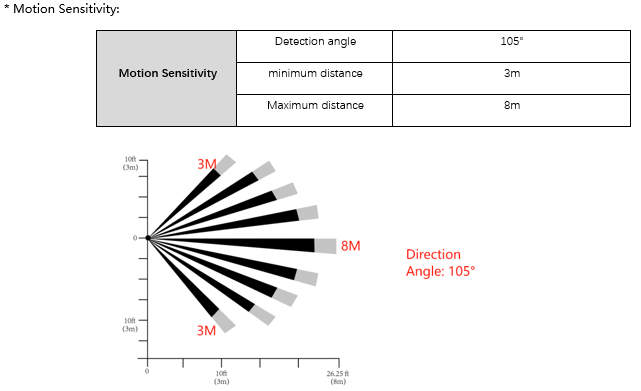
What type of motion sensor is utilized?
- The ZEN12 uses PIR technology. A PIR (Passive Infrared) motion sensor detects movement by sensing changes in infrared (heat) energy emitted by people and animals. Unlike cameras, it doesn't capture images or video. Instead, it monitors the heat patterns within its detection area and triggers when a warm object moves across the sensor's field of view. This makes PIR sensors energy-efficient, reliable, and well-suited for automatically turning lights on when motion is detected.
Can I reduce the detection range for the motion sensor?
- The ZEN12 uses a PIR motion sensor with a maximum detection range of approximately 26 feet (8 meters) at the highest sensitivity setting (10). By default, it's set to sensitivity level 5, which provides a detection range of about 13 feet (4 meters). Our testing has shown the default setting consistently detects motion from around 13–14 feet away.
- If you're looking to reduce the detection distance to around 7 feet (2 meters), the lowest sensitivity settings (1–2) are your best option. Those settings are designed to provide the shortest supported detection range, approximately 2 meters. Because they're already at the lower limit of the sensor's capabilities, you may not notice much difference between sensitivity levels 1 and 2.
- However, reducing the detection range below approximately 2 meters isn't something the sensor is designed to support.
- If your goal is to prevent the lights from turning on when someone walks past during the day, but still have them activate at night, the ZEN12 also includes Night Mode. This allows the motion sensor to trigger the lights only when the ambient light level is below your configured lux threshold, which may be a better solution depending on your application.
Does the ZEN12 have power / energy monitoring features?
-
No. None of our switches or dimmers have energy monitoring capabilities and there currently aren't any plans to include this functionality in the near future.
How many motion dimmers can you have in a house and do they all talk to each other?
-
You can have any number of ZEN12's in a smart home - they can be programmed to communicate with each other via the hub.
-
To control the devices remotely and access the advanced features, you would need a Z-Wave hub. Zooz switches/dimmers communicate via Z-Wave, and would require a hub to allow you to control them remotely.
Will the ZEN12 act as a signal repeater for other Z-Wave devices in my network?
-
Mesh: Yes. Your Z-Wave hub decides which devices to use to reach other Z-Wave devices. Any non-battery powered Z-Wave device will act as a signal repeater; it would be up to your hub whether or not it will be used in a communication route.
-
Z-Wave Long Range: No. There are no repeaters in Z-Wave Long Range by nature; it is a hub-to-device direct protocol that does not use repeaters.
Is the big button programmable or does it absolutely have to control the connected light?
-
You do not need to have a load connected to the main button of the ZEN12. It can be programmed to act as a remote switch button, as can the smaller buttons on the unit.
Z-WAVE QUESTIONS
Do I need a Z-Wave hub to buy this device?
-
It is recommended. The big button on the ZEN12 will function like a regular dimmer and can be used as such without a Z-Wave hub; however, to have remote control and access the advanced features, you would need a Z-Wave hub. The ZEN12 communicates via Z-Wave and would require a hub to allow you to control it remotely.
-
To control any of our Z-Wave devices remotely through your smart phone, you'll need a compatible Z-Wave hub. These devices require a central controller that communicates with them and sends commands. Once you have a controller, you would download that controller's dedicated app on your phone and control your connected devices through that app.
Will I still be able to control the ZEN12 if my Z-Wave hub is down or offline?
-
If you have a load connected to the ZEN12, you'll still be able to control it manually.
-
If you're using the ZEN12 strictly as a scene controller with no load connected, you won't be able to trigger any scenes or automations if the hub is offline.
-
If you programmed direct associations on the buttons, there will most likely be a big delay between pressing the button and activation of the associated device.
-
Any device will always try to first communicate with the hub, which is associated to it in Group 1 during inclusion. That means that if the hub is down or unavailable, the device will still try to communicate with it a few times before it gives up and sends an update to the other groups (and devices associated in these other groups) which may create a communication delay if the hub is down or unavailable.
-
The Z-Wave protocol requires Group 1 lifeline communication to be present at all time and it doesn't allow to remove it at any point. A device wouldn't pass certification otherwise. There's currently no way to have Z-Wave devices associate with one another without the lifeline communication or interface but we'll definitely propose this technology change to the Z-Wave developers and will implement it in our products in the future.
-
Is the ZEN12 compatible with my hub?
-
You can find a list of compatible hubs for a given device under the Works With section on the product's page. Here is the list of hubs compatible with the ZEN12.
Will the ZEN12 work with my alarm panel?
-
No. Alarm panels like Alarm.com will typically only support single switches, door locks, select thermostats, and any authorized items on their list. We would recommend reaching out to your alarm panel company to verify compatibility and to get the latest on any device integrations they may be working on.
-
It would be up to your alarm panel to integrate the ZEN12, as it follows Z-Wave protocol and has been Z-Wave certified. There is nothing we can change on our end to have the Scene Dimmer be recognized correctly; Alarm.com would have to support the integration. Read more about alarm panel compatibility here.
Where do I find all of my ZEN12's advanced settings?
How do I add the ZEN12 to my Z-Wave hub?
How does the ZEN12 display in my Z-Wave hub?
-
The ZEN12 will only display as a dimmer on most hubs. I
How can I tell what firmware my ZEN12 is running on?
-
The firmware that your device is shipped with should be printed on the back of the device where the model specifications are. If your hub supports and properly integrates the device, you should also see the firmware listed in your Z-Wave interface.
How do I update the firmware of my ZEN12?
How long does the update take? How do I know when it's finished?
-
Firmware updates should usually take anywhere from 5 to 15 minutes depending on connection quality and how much information needs to actually be updated on a given device.
-
If it is taking longer than that, please try to bring the hub / controller closer to the device that is being updated.
-
Where can I find the history of changes and firmware updates for the ZEN12?
What series Z-Wave chip does the ZEN12 use?
-
The ZEN12 uses an 800 series Z-Wave chip.
Is the ZEN12 available in other Z-Wave frequencies?
-
The ZEN12 is currently available in 908.42 MHz (US) frequency only. We do not currently have plans to release it in EU or AU frequency.
Does the ZEN12 support Z-Wave Long Range?
-
Yes, the ZEN12 supports Z-Wave Long Range (ZWLR). Note: in order to use ZWLR, both the hub and the end device must support ZWLR.
Check out the Zooz Knowledge Base for free support articles about the ZEN12 Motion Dimmer (and all of our devices)! If you can't find your answer there, reach out to us!

