

Trouble with your ZEN12 Motion Dimmer? Try factory reset!
If your Scene Dimmer is unresponsive to manual and Z-Wave control, and you've already tried excluding the device from your network, then a factory reset is the next step. A hard reset will erase all custom settings and recorded activity, returning the device to factory defaults.
Factory Reset Process
-
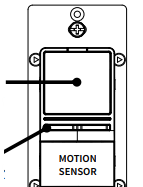
Press and hold the large main button for 10 seconds until the LED indicator starts blinking green.
-
Release the button, and immediately after, tap the left dimmer button 5 times to complete the reset.
-
The LED indicator will flash red 5 times to confirm successful reset and cycle through the LED colors.
NOTE: All previously recorded activity and custom settings will be erased from the device’s memory.
Once the reset is complete, include the ZEN12 back to your hub to verify the issue is now resolved.

