


Zooz offers a wide range of Z-Wave relays designed to automate everything from basic lighting to high-powered appliances. With options for dry contact control, sensor inputs, and multi-load switching, these relays are flexible tools for both DIY and professional smart home installations.
This article provides a complete overview of all current Zooz relay models, including their supported loads, power requirements, and recommended use cases. Whether you're looking to automate a garage door, control a pool pump, or integrate with an alarm panel, this guide will help you choose the right relay for your setup.
🔌 What Is a Smart Relay (and Why Would You Use One)?
Relays are powerful tools in smart home automation that let you control circuits in ways a wall smart switch can’t. At their core, a relay is simply a remote-controlled switch—but with more flexibility in how and what it controls.
Unlike popular Z-Wave wall switches that directly power a light or fan, relays act as a bridge between your smart home system and other electrical devices, allowing you to automate anything from garage doors and gate openers to sprinkler valves. Smart relays utilize regular mechanical relays as the executive element, however they work in a slightly different way, providing more flexibility for your installations.
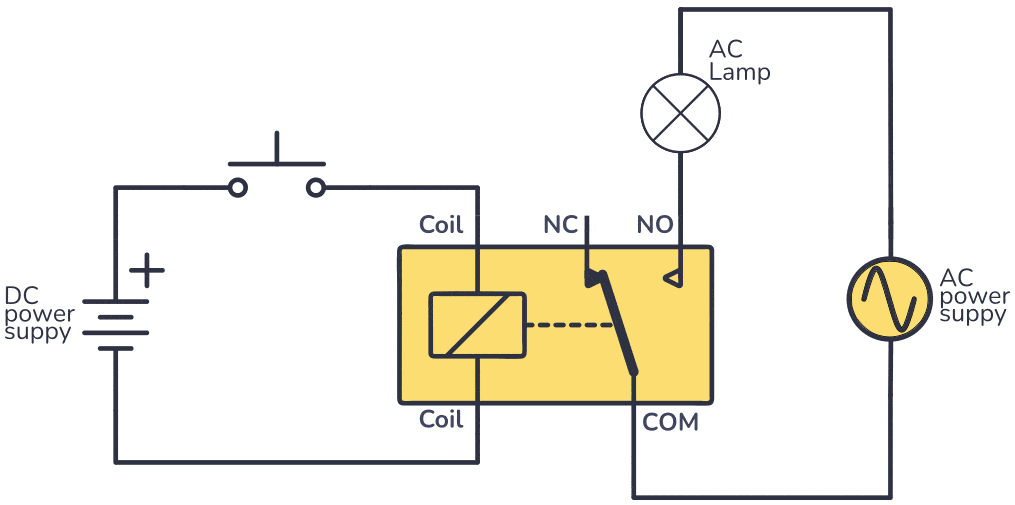
A smart relay uses a low-power electrical signal to control a higher-power circuit, acting as an intermediary between the control signal and the load. Essentially, it allows a low-power circuit (like a sensor or a button) to control a much larger and potentially dangerous circuit (like a motor or a high-power lamp).
🧠 Important Terms
-
Control Circuit: A low-power electrical signal (like from a sensor or microcontroller) is sent to the relay's coil, creating a magnetic field.
-
Switching Mechanism: This magnetic field pulls a switch (or contacts) inside the relay, connecting or disconnecting the higher-power circuit.
-
Isolated Circuits: The control circuit and the controlled circuit are electrically isolated from each other, enhancing safety and preventing interference.
-
Input and Output: these terms are there for easier description. Please note that there is no connection between them, nor is voltage being passed from the input to the output. These parts are totally separated.
🤔 Why Use a Z-Wave Relay Instead of a Smart Wall Switch?
-
Isolation: Relays provide electrical isolation between the control and controlled circuits, which is crucial for safety and preventing damage from high voltages or currents.
-
Amplification: A small control signal can switch on/off a much larger load, effectively amplifying the control signal's power.
-
More Flexible Voltage Support: Relays can work with low-voltage DC, high-voltage AC, or voltage-free circuits, making them useful in places where smart wall switches can’t be safely or easily used (they are typically designed for lighting applications and can operate under the standard 120 V conditions only).
-
Multiple Device Control: Some relays (like the ZEN16 or ZEN52) can control multiple independent loads via one device, saving space and cost.
-
Sensor Integration: Relays like the ZEN17 and ZEN58 can also monitor analog binary sensor inputs and trigger automations based on physical events (like water leaks or open doors).
-
Electrical Isolation: In cases where the input signal and the controlled output should remain electrically separate (for safety or system compatibility), a relay with isolated input/output (like the ZEN17 or ZEN58) is the ideal choice.
🔌 Zooz Relay Model Overview
Below you'll find a quick summary of all current Zooz relay models, including their supported loads, power requirements, and recommended use cases.
🔧 ZEN16 MultiRelay
Key Features:
-
3 independently controlled dry contact relays
-
NO by default; NC available via firmware 1.03+
-
-
Powered by 12-24V AC/DC or USB-C
-
Supports loads up to 15A, with Relay 3 supporting loads up to 20A
-
Optional wall switch inputs (dry contact only)
-
Inputs and outputs can be separated on version 2.0 and higher
Best For:
Any 12-240V load requiring up to 15A/20A control.
-
Garage doors (non-smart/no MyQ, etc.)
-
Whole-house fans
-
Landscape lighting
-
Sprinkler systems
-
Pool pumps
-
Gas fireplaces
-
Doorbell buttons
🔧 ZEN17 Universal Relay
Key Features:
-
2 independently controlled NO or NC relays
-
2 dry contact or 12-24V sensor inputs (separated)
-
Max Load
-
NO: 20A
-
NC: 10A
-
-
Powered via 12-24V AC/DC or USB-C
-
Inputs and outputs can be separated
Best For:
Two-way DC motor control or installations where both relay control and sensor feedback are needed.
-
DC motors (awnings, blinds, shades)
-
Commercial gates
-
Garage doors (non-smart/no MyQ, etc.)
-
Gas fireplaces
-
Sprinkler control
-
Landscape lighting
🔧 ZEN51 Dry Contact Relay
Key Features:
-
Dry contact output, voltage-based input (120V)
-
Powered by 120-240V AC
-
Smart bulb mode + multi-tap scene support
-
Designed for 3-way/multiway lighting with 120V switches
Best For:
Dry contact loads in 120V lighting applications. Great behind existing switches when 120V is available.
-
120V dry contact applications
-
Switch automation without changing wall switch style
-
Reports 120V signal presence which is useful when checking the on/off state of the device (good for
motors, pumps, etc. if you need to monitor the status.
🔧 ZEN52 Double Relay
Key Features:
-
2 independently controlled relays
-
120-240V AC, up to 5A per relay
-
Smart bulb mode + scene control
Best For:
Controlling two independent 120V loads from a single module.
-
Fan/light combo control
-
Dual-switch gang boxes
🔧 ZEN53 DC Motor Controller
Key Features:
-
Controls 6-32 VDC DC motors with momentary switch input
-
Choose shutter or venetian blind modes
-
Automate based on brightness, temperature, and motion sensors
-
Create morning and evening routines
-
Installs behind existing wall switch or at motor
-
Pigtail wires included for easy installation
Best For:
Motorized window treatments, retractable awnings, and shades requiring low-voltage DC motor control and smart automation.
🔧 ZEN55 Smoke & CO Detector Bridge
Key Features:
-
Reports smoke and CO alarms separately from major brands like First Alert, Kidde, BRK
-
Optional 120V relay for controlling lights or sirens
-
Built-in signal repeater (not applicable in Long Range mode)
-
Installs inside last detector box for best wiring management
-
Pigtail wiring included for quick installation
Best For:
Integrating hardwired interconnected smoke and CO detectors into your Z-Wave smart home system for status monitoring.
🔧 ZEN57 240V XS Relay
Key Features:
-
Wet contact relay (line voltage passes through)
-
Dry contact input
-
Powered by 100-200V AC
-
Scene control and Smart Bulb Mode
Best For:
Space-constrained installations that need a Z-Wave-controlled line-voltage load.
-
Tight switch boxes (great for EU standard small boxes)
-
Light fixture installs with limited space
-
Applications with line/load in the same box
🔧 ZEN58 Low Voltage XS Relay
Key Features:
-
Dry contact relay and dry contact input (fully isolated)
-
Powered by 9-40V AC/DC
-
Screw terminals for easy integration into low-voltage systems
-
Separate input/output functionality
-
Child device option via Notification Command Class
Best For:
Fully isolated control and monitoring scenarios where low-voltage power and signaling is required.
-
Alarm panel integration
-
Gate and garage door systems
-
Keypad/button-based automation
🔧 ZEN78 High Power Relay
Key Features:
-
Dual-pole 40A relay
-
Manual control via action button or mechanical switch input
-
Built-in overcurrent protection
-
Dry contact switch terminal
-
Integrated temperature sensor
-
Indoor use recommended; can be used outside within a weatherproof enclosure within the operating temperature of the device.
Best For:
High-current 240V installations where safety, reliability, and automation are crucial.
-
Pool pumps
-
Water heaters
-
EV charging
-
Heated driveways
-
Mini splits or large HVAC units
-
High-power 240V appliances (up to 40A)
-
Outdoor lights (parking lots, tennis courts, pools, etc.)
🧰 Installation Type Recommendations
| Application | Top Model | Wiring Diagram | Possible Alternatives | Reason / Notes |
|
Garage Doors |
ZEN17 ZEN16 (VER 2 & up) |
|
|
|
| Gates | ZEN58 |
|
||
| Gas Fireplace |
ZEN58 ZEN16 |
|
ZEN17 |
|
| Sprinklers | ZEN16 | ZEN16 Sprinkler Diagram |
|
|
|
Pool Equipment |
ZEN78 |
|
||
|
Whole House Fan |
ZEN17 |
ZEN16 |
|
|
| Landscape Lighting | ZEN16 ZEN17 |
ZEN16 Landscape Lighting Diagram
|
ZEN58 |
|
|
Lighting (120-240V) |
ZEN57 | ZEN57 Diagrams |
|
|
| DC Motors (screens, blinds, etc.) | ZEN53 | ZEN53 Diagrams |
|
|
| Alarm Panel Integration | ZEN58 | - |
|
|
| Button or Keypad Triggers | ZEN58 | - |
|
|
| Fan + Light Combo | ZEN52 |
ZEN30 ZEN75 |
|
|
| Smoke & CO Detector Monitoring | ZEN55 | ZEN55 Diagram | - |
|
| High Power Appliances | ZEN78 | Standard Diagram in Manual | - |
|
🔍 Choosing the Right Relay: Key Questions to Ask
When selecting the best Zooz relay for your application, it’s crucial to consider the following aspects to ensure safe, functional, and long-lasting automation. Here’s a breakdown of what to ask and how to answer it:
🧠 1. What kind of load are you switching?
| Load Type | Description | Best Options |
| Dry Contact (Voltage Free) | Use when you're only completing a circuit (e.g., doorbell, garage door, access control |
|
| Powered Load (Line Voltage) | Switching 120V or 240V directly (e.g., fans, lights, pumps, heaters) |
|
| DC Motor Load | Requires directional control and support for 6-32V DC motors (e.g., blinds, shades, shutters) |
|
⚡ 2. What’s your power source?
How do you plan on powering your device? Do you have access to 120V or 240V power, or will you need a low voltage option?
| Power Source | Compatible Devices |
| 120V AC / 240V AC | ZEN51, ZEN52, ZEN54, ZEN55 (via 120V relay), ZEN57, ZEN78 |
| 12-24V AC or DC | ZEN16, ZEN17, ZEN58 |
| 6-32V DC | ZEN53 (for direct motor power and operation) |
| USB-C (5V regulated) | ZEN16, ZEN17 (as an alternative to 12–24V power) |
🖥️ 3. Do you need to monitor a sensor input?
Some installations require feedback from a sensor, such as a leak detector, door sensor, float switch, or wall switch button.
| Sensor Input Type | Description | Compatible Devices |
|
Dry Contact Sensor Input (no voltage) |
For passive switches or sensor loops with no voltage applied |
|
| 12-24V Powered Sensor Input |
For sensors that output 12-24V |
|
| Voltage-Based Input (e.g., 120V switch) | For standard 120V wall switch control where the switch leg is live |
|
🔌 4. Do you need isolation between input and output?
-
If the input signal (e.g., button press) must not pass voltage to the relay output, electrical isolation is required.
-
Best Option for Isolation:
-
ZEN58: Offers full separation of input and output — ideal for access control and alarm systems.
-
ZEN17 (also ZEN16 V2 or higher): Relays and inputs can be separated (but not electrically isolated like ZEN58).
-
📏 5. How much installation space do you have?
Some switch boxes or junctions may be too tight for full-sized modules.
| Device | Size & Space Notes |
| ZEN57 | Smallest footprint (1.2" tall x 1" wide x 0.6" deep) - best for shallow or crowded spaces |
| ZEN51, ZEN52, ZEN58 | Compact, slightly larger than ZEN57 ( 1.5" tall, 1.4" wide, 0.7" deep) |
| ZEN16, ZEN17 | Wall-mountable, larger (4" x 2.5" x 1.5") – not suitable for tight switch boxes |
| ZEN78 | Large footprint – intended for panel mounting in controlled environments (not wall switch boxes) |
🔋 6. Is the load high-power (e.g., water heater, EV charger)?
Loads above 20A, especially at 240V, need a relay with higher current and voltage tolerance.
-
Best Option for High-Power Loads:
-
ZEN78: Handles up to 40A at 240V with double-pole relays, including overcurrent and thermal protection.
-
-
Other Load Ratings (For Reference):
-
ZEN16/17: Up to 20A (dry contact)
-
ZEN51/52: Up to 10A per relay
-
ZEN57: 5A max
-
ZEN53: DC motor rated, per motor specs
-
📦 Final Thoughts
Zooz Z-Wave relays cover virtually every application in smart automation, from simple lighting control to industrial-level automation. Whether you're working on a DIY smart home upgrade or wiring up a full professional install, selecting the right relay is critical for safety, performance, and ease of integration.
Need help selecting the right device? Our support team is always here to help with personalized advice.
Please be ready to provide all of the following information so our team can accurately assist you!
- A link or PDF of the manual to the device you are looking to control. Please ensure the information provided contains the following:
- Specs with Voltage, Amperage, and Wattage
- Wiring diagram for the device
- Images of the existing wiring (.JPG or .JPEG format). Please ensure your images contain the following:
- All wires involved in the installation
- Where all wires connect on the device and from the source (both ends of each wire)
- Is there an existing switch currently controlling the device?
- If yes, what kind of switch? (Momentary, toggle, push button, etc.)
- Do you plan to maintain control from the switch?
- A description of the goal of the installation. How would you like to be able to control the ____ with the Zooz device (on/off control via Z-Wave only, automations, etc)? Please provide as much detail as possible so we can accurately assist.
- What hub/Z-Wave system you are/will be using with the device so we can verify compatibility?
- If you are requesting a custom wiring diagram, please register your device in our Product Registration Portal. Registration provides direct access to custom instructions and expedited support.
Questions? Just ask!

