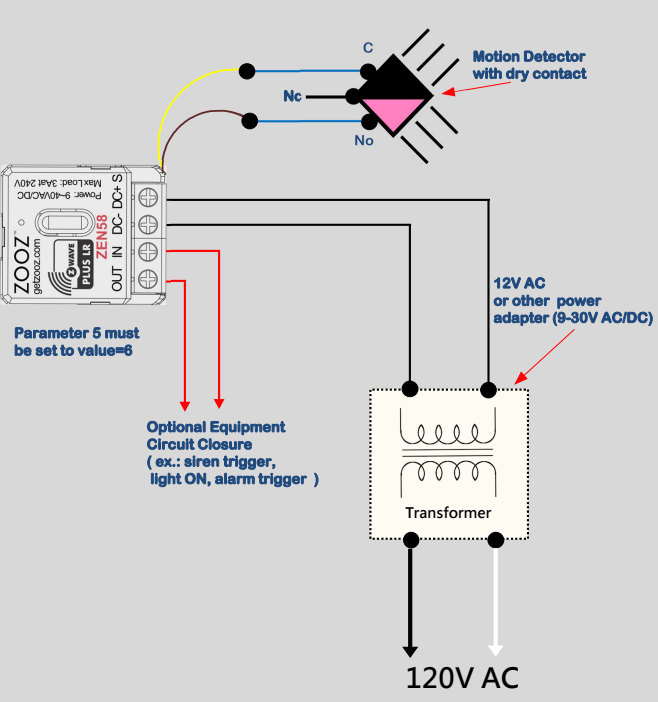
The ZEN58 Low Voltage Relay can be paired with an existing wired motion detector to bring traditional security style sensors into your Z Wave smart home system. In many installations, the relay is powered by a 12 V DC supply, which is often the same power source already used by an analog motion detector connected to a legacy alarm panel. Before wiring the devices together, confirm that the 12 V DC supply is stable and rated to handle the combined load of both the relay and the motion detector.
This setup is designed for analog motion detectors that provide a dry contact output. To confirm your detector will work, open the motion detector housing and locate the small terminal block on the circuit board. Look for terminals labeled C and NO, C and NC, or C with both NO and NC. The presence of these terminals indicates the detector includes a dry contact output and can be connected to the ZEN58 relay.
Please note that not all motion detectors are suitable for this type of connection. Sensors that provide only a voltage output instead of a dry contact signal will not work with the ZEN58. Likewise, smart bus based or fully digital sensors that communicate only with their native alarm panel and do not include built in relay contacts are incompatible. If you open the detector and do not see any terminals marked C, NO, or NC on the terminal block, the device most likely does not offer a dry contact output and cannot be used with the ZEN58 relay.
WIRING TIPS
PHOTOS: Always take clear, detailed "before" pictures prior to installing the ZEN58. Should you ever need to restore the original set-up, or reach out to us for help, we will need to verify the original wiring to ensure the installation is correct.
TOOLS: Always use the correct screwdriver size for the ZEN58 terminals. Please verify you have the proper electrical tools for cutting, prepping, and stripping electrical wires. If you lack the necessary tools to correctly perform the installation or are unsure which tools to use or how, please hire an electrician to complete the installation for you. Please follow the National Electrical Code and your local safety regulations when performing the installation, including (but not limited to), choosing the correct gauge of jumper wires.
POWER OFF: Please verify you have turned off the circuit power in the breaker panel before you start the installation. Keep the ZEN58 removed from its power source while performing the installation.
WIRING INSTRUCTIONS
HOW TO CONNECT THE ZEN58
Turn off power to the transformer.
- Before making any connections, disconnect power from the 12 V transformer or power adapter supplying the system.
Connect the transformer to the ZEN58 power terminals.
- Run one wire from the transformer to the DC+ terminal on the ZEN58.
- Run the second transformer wire to the DC− terminal on the ZEN58.
Wire the motion detector common terminal.
- Locate the terminal marked C on the motion detector.
- Connect this C terminal to the IN terminal on the ZEN58.
Wire the motion detector NC terminal.
- Locate the terminal marked NC on the motion detector.
- Connect this NC terminal to the DC+ terminal on the ZEN58.
Restore power to the transformer.
- Turn the power supply back on once all wiring is complete.
Set the required configuration parameter:
- In your Z Wave hub settings for the ZEN58, set Parameter 5 to value 6 so the relay correctly interprets the motion detector input. After changing the parameter:
-
Exclude the ZEN58 from the Z-Wave network.
-
Include it again.
-
After re-inclusion, an additional Motion Sensor entity will appear in the Z-Wave UI.
-
Test the installation
- Trigger the motion detector and confirm that the ZEN58 registers the input and activates the output as expected.
OPTIONAL
Using the Relay Output with Motion: The ZEN58 also includes a dry contact relay output, which can optionally be used to control other equipment if needed.
-
This can be used for triggering a small light, activating a wired siren, controlling another low-voltage device, or triggering a zone on another panel
- Use the two OUT terminals on the ZEN58 as a dry contact relay output.
- Connect these two terminals to the low voltage trigger input of the device you want to control, such as an alarm input or lighting trigger circuit.
DEFAULT BEHAVIOR
With the wiring above, the behavior will be as follows:
-
When motion is detected on the input,
-
The ZEN58 relay will turn ON.
Optional: Separating Input from Output
If you want the motion input to be used only for notifications and not control the relay:
-
Set Parameter 11 = value 1