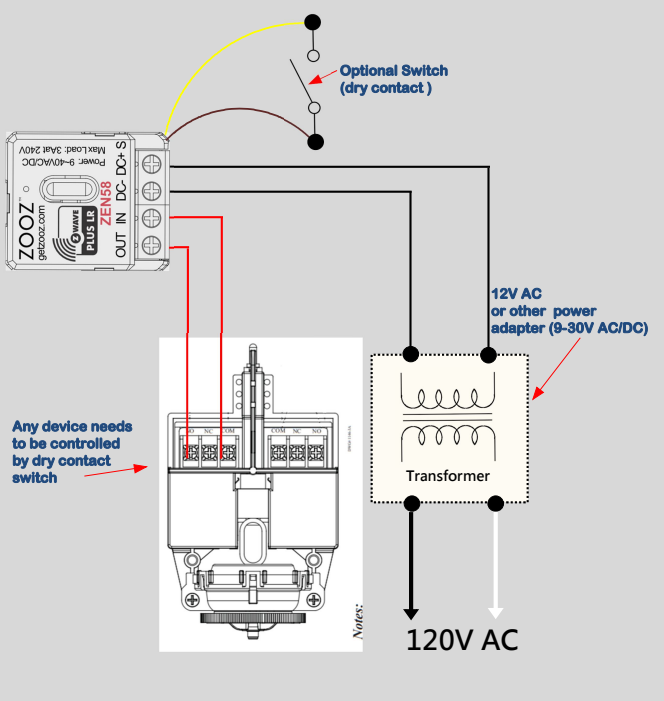
Not every ZEN58 setup fits neatly into a predefined diagram and that is exactly why this guide exists. If you are working with a device that relies on a dry contact input and you do not see your exact use case documented elsewhere, this general wiring diagram shows the core method for triggering those devices with the ZEN58.
It focuses on the underlying wiring logic rather than a single application, making it useful for a wide range of scenarios including custom builds and less common equipment. By using this approach, you are not limited to known examples and can confidently adapt the ZEN58 to devices and use cases beyond what is explicitly listed in our library.
General Wiring Tips: Please ensure you take "before" pictures prior to installing the ZEN58. In case you need to restore the original set-up, or reach out to us for input, we will need to verify the original wiring to ensure the installation is correct. Always use the correct screwdriver size. Verify you have the correct electrical tools for cutting, prepping, and stripping electrical wires. If you lack the necessary tools to correctly perform the installation or are unsure which tools to use or how, please hire an electrician to complete the installation for you. Please follow the National Electrical Code and your local safety regulations when performing the installation.
Power Off: Always ensure the circuit power is off in the breaker panel before you start.
Optional Mechanical Switch Input
-
A mechanical switch can be connected to the ZEN58 dry contact input for local control.
-
Supported switch types include:
-
Decora-style toggle switches
-
Traditional toggle switches
-
Momentary (push-button) switches
-
-
No voltage should ever be applied to the dry contact input terminals.
Configuration Notes
-
No parameter changes are required out of the box — the ZEN58 will operate correctly with default settings.
-
Depending on the application, users may optionally:
-
Separate input control from output behavior
-
Select a specific input type (toggle or momentary)
-
-
These adjustments are application-specific and may vary by installation.