


How To Wire My ZEN76 S2 Switch

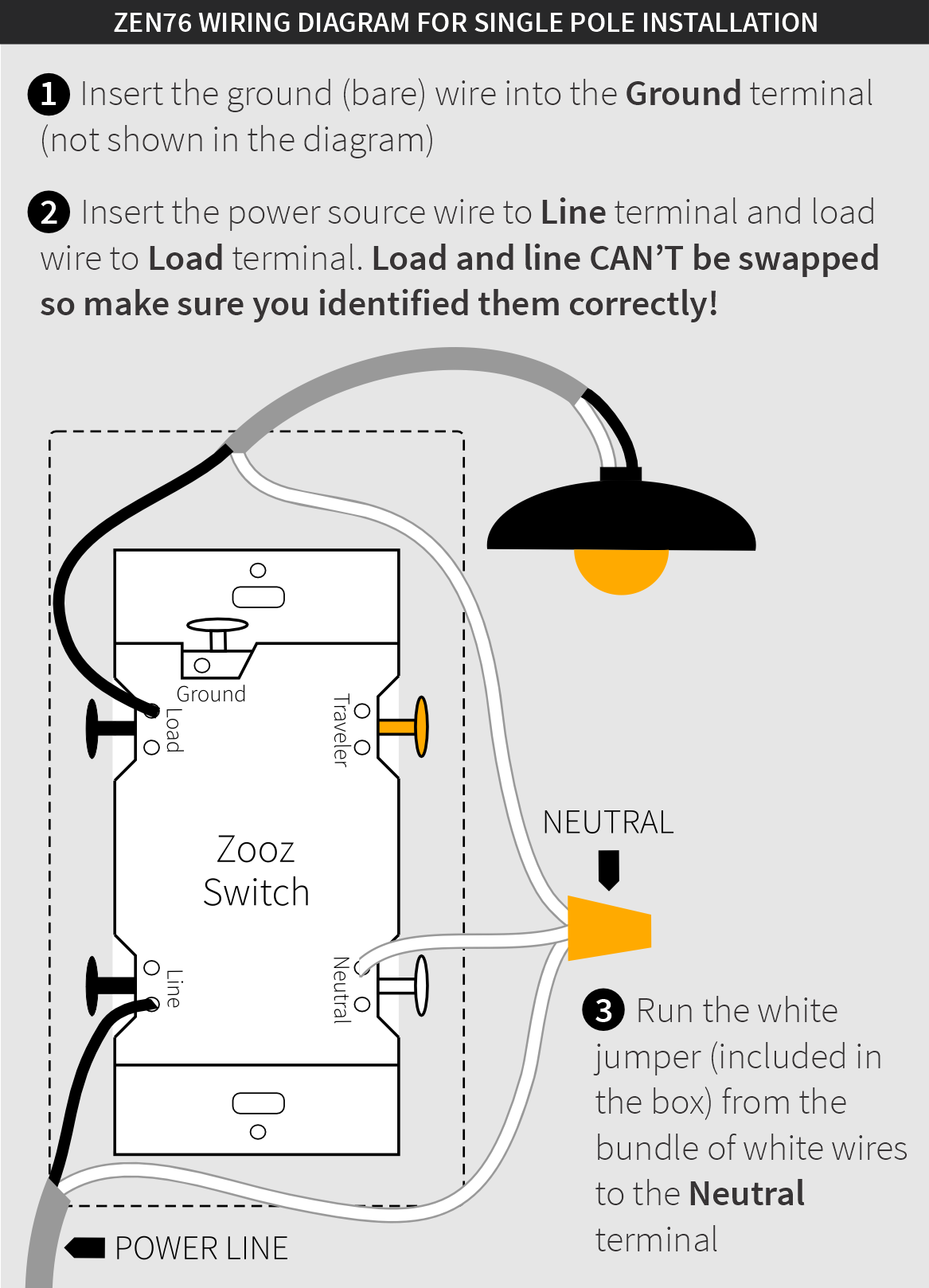
You can wire your Zooz S2 switch in a single pole or multi-way set-up as long as one of the boxes has power and neutral coming in directly from the breaker. The diagrams and instructions below are for the ZEN76 model (do not use them for other switch models unless they're included in the diagram description). There's always only one correct option to wire your smart switch so please make sure you can match your set-up to the appropriate diagram before attempting the installation.
How can you identify power and neutral in your wiring? The easiest way to find out is to look for a black wire bundle and white wire bundle in the back of your multi-gang box. If you're dealing with single boxes only, you'll need to measure voltage on the black leads coming into each box in a 14-2 romex. Still not sure what you're looking for? Send us a few pics and we'll help you out!
Here are some things to note before you proceed with the installation:
- You have to install the Zooz switch in the box with direct connection to power line and neutral.
- The colors of your wires may not match the ones in our diagrams so please make sure you've identified all wires correctly based on their source, not color only.
- IMPORTANT: Once you connect your switches, please secure them in the box, making sure any bare wires and screws are isolated with electrical tape. After the switches are settled back in the box and the wall plate is re-installed, you can turn the power on and test the switches for on/off operation.
- The diagrams show all connections but ground (it was excluded to simplify the illustration). Make sure all ground wires are connected to all switches respectively.
ZEN76 SINGLE POLE WIRING DIAGRAM
MULTI-WAY SET-UPS
VIRTUAL MULTI-WAY SET-UPS (using multiple Zooz switches in 3-way and 4-way installations)

