You are using an unsupported browser. Please update your browser to the latest version on or before July 31, 2020.
close
You are viewing the article in preview mode. It is not live at the moment.
Looking for Z-Box Hub Support? Please click here to access the Z-Box Hub Support Portal.
Home > Hubs & Network > ZAC38 800 Z-Wave Range Extender > ZAC38 & HomeSeer > How to Program Power Outage Alerts From the ZAC38 Range Extender on HomeSeer
How to Program Power Outage Alerts From the ZAC38 Range Extender on HomeSeer
print icon

The ZAC38 Range Extender includes a built in backup battery that allows it to continue operating even when mains power is lost. When the device detects a transition from mains power to battery power, it reports this change to the Z Wave network. This power status change can be used by your hub as a reliable event trigger.

In this knowledge base example, we will walk through how to use the power outage event to send a notification to the user. However, the same reported event can be used for any type of automation you want to create. This includes sending alerts, triggering scenes, activating other devices, or combining it with additional conditions in your automation system.


The key concept is that the ZAC38 actively reports when it switches from mains power to battery backup (and vice versa), and this report can be leveraged as a trigger in your hub to build flexible and meaningful automations around power loss events.


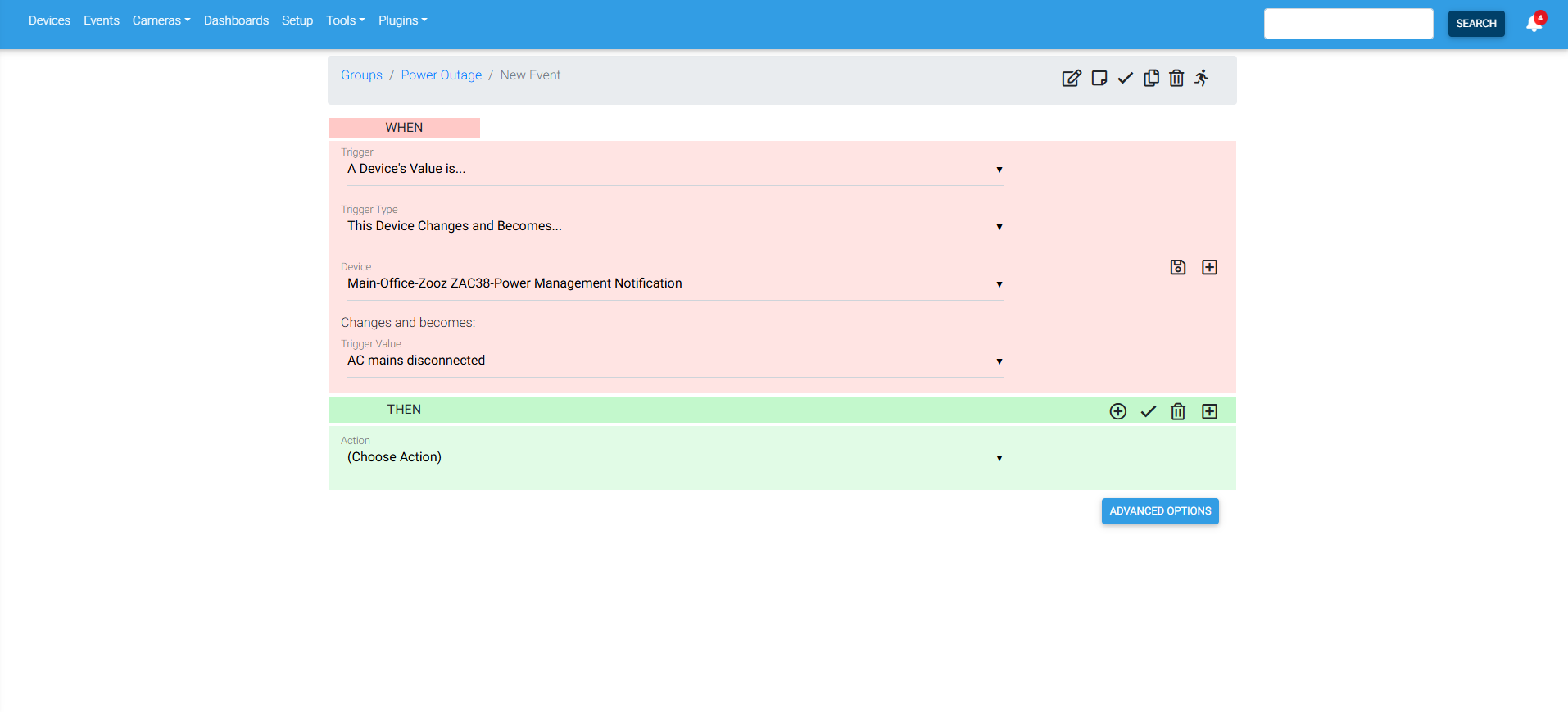
On HomeSeer Z-Wave Plus, go to Events.

Create a new event, and fill in the When fields as shown below. You can use this to trigger any scene or device in your hub as well as send a notification.
 

Feedback
0 out of 0 found this helpful

Have you tried our virtual assistant chatbot? This AI tool can help you find answers from thousands of articles in our Knowledge Base quickly. Find it in the bottom righthand corner of the page.

Need more help? Our friendly team is ready to help you with any questions or concerns you may have about Zooz devices. Click here to submit a support ticket.

Are your devices registered? Extended warranty and firmware access is available for registered Zooz customers. Click here to submit your registration form.

Find the latest Zooz devices and great Z-Wave deals at The Smartest House.
 
scroll to top icon