


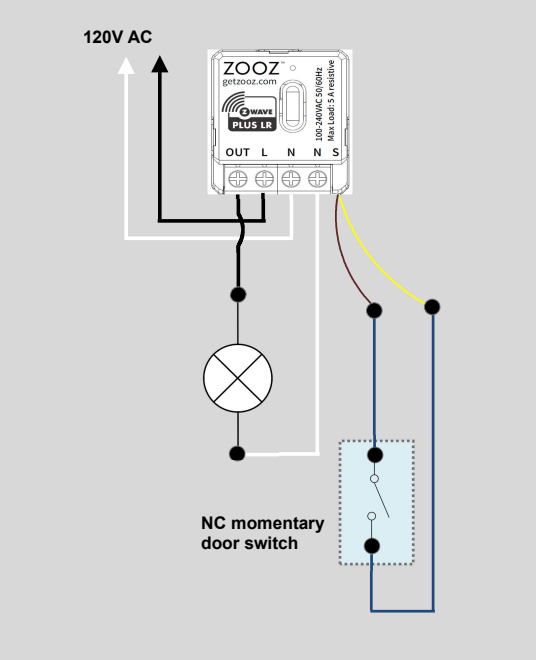
This wiring configuration uses the ZEN57 relay to automatically control a 120 V AC closet light based on the door position using a normally closed (NC) momentary door switch (reed or plunger type).
WIRING TIPS: Always "before" pictures prior to installing the ZEN17. Whether you need to restore the original set-up, or reach out to us for help, we will need to verify the original wiring to ensure the installation is correct. Ensure you use the correct screwdriver size for the terminal screws on your Universal Relay and wall switches (if connecting them). Please verify you have the proper electrical tools for cutting, prepping, and stripping electrical wires. If you lack the required tools to correctly perform the installation or are unsure which tools to use or how, please hire an electrician to complete the installation for you. Please follow the National Electrical Code and your local safety regulations when performing the installation, including (but not limited to), choosing the correct gauge of jumper wires. The recommended gauge for 15 Amp circuits is 14 AWG and 12 AWG for 20 Amp circuits.
POWER OFF: Please verify you have turned off the circuit power in the breaker panel before you start the installation. Keep the Universal Relay unplugged from its power source while performing the installation.
WIRE THE ZEN57 XS RELAY
Follow the instructions below to connect the ZEN57. Important notes:
-
The door switch must be normally closed (NC).
-
With the door closed, the NC switch remains closed, and ZEN57 is off as well
-
When the door opens, the switch opens, and ZEN57 turns on.
Connect to Power
-
Line (Hot) from the 120 V supply is connected to the L terminal on the ZEN57.
-
Neutral from the supply is connected to the N terminal on the ZEN57.
-
These connections provide operating power to the ZEN57.
Connect to the Load (light)
-
The hot lead of the light fixture is connected to the OUT terminal on the ZEN57
-
The neutral lead of the light fixture is connected directly to the N terminal on the ZEN57
-
When the ZEN57 output turns ON, power is supplied to the light.
Connect the Door Switch (NC)
-
One side of the normally closed door switch is connected to the S terminal on the ZEN57 - yellow pigtail
-
The other side of the normally closed door switch is connected to the S terminal on the ZEN57 - brown pigtail
Operation logic
-
The ZEN57 is configured so the S input controls the relay output (default behavior out of the box)
-
Opening the door changes the S input state, turning the light ON.
-
Closing the door restores the NC contact, turning the light OFF.
-
The light can also be controlled via Z-Wave if desired.
If you want to monitor the S input separately from the output, you can set parameter 5 to value 7 – open/close alert (door sensor). Once set, please exclude and reinclude the ZEN57 so a child device is created to monitor the input separately.

