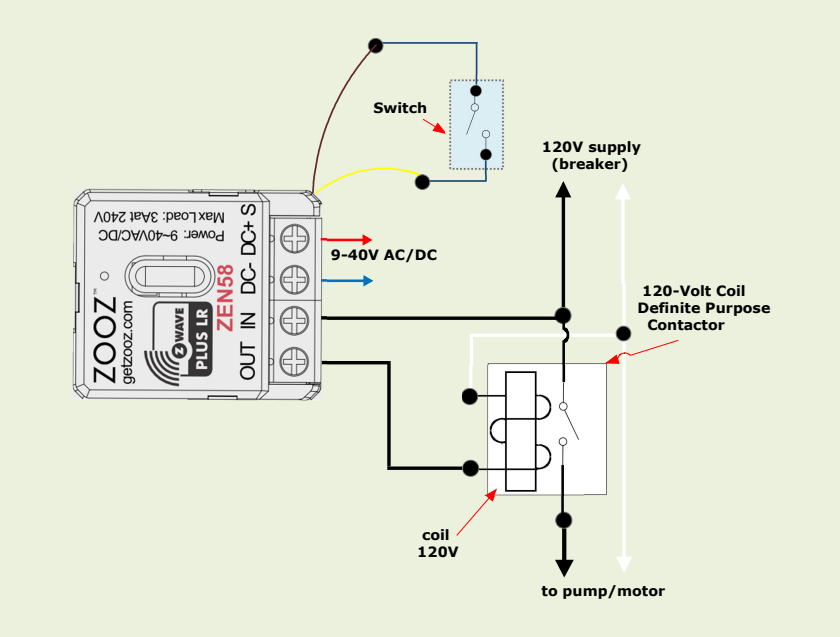
If you need Z Wave control over a pump, motor, heater, or other heavy load, the ZEN58 paired with a 120 V contactor lets you do it safely without pushing the relay beyond its limits.
Devices like pumps, motors, heaters, and other high current equipment should never be wired directly through the ZEN58, as these loads exceed the limits of its internal 3A relay.
Instead, the ZEN58 is used as a low power control device that switches the coil of a contactor. The contactor then handles the actual high power load on the circuit. In this configuration, the ZEN58 provides reliable Z Wave control while the contactor is responsible for carrying and switching the heavy electrical current.
By separating control from power in this way, you stay within the ZEN58’s electrical ratings, reduce wear on the relay, and create a much safer and more robust installation for high load applications.
Controlling Heavy Loads With a Contactor
-
Heavy loads such as pumps, motors, heaters, and other high-current devices should not be connected directly to the ZEN58.
-
The ZEN58 can be used to control the 120V or 240V coil of a contactor, while the contactor itself handles the high-power load.
-
In this setup, the actual load does not pass through the ZEN58’s internal 3A relay, which keeps the installation safe and within device limits.
Installation Safety
-
Contactor-based installations typically involve 120V or 240V wiring.
-
For safety and compliance, we strongly recommend having a licensed electrician perform this type of installation.
Optional Mechanical Switch Input
-
A mechanical switch can be connected to the ZEN58 dry contact input for local control.
-
Supported switch types include:
-
Decora-style toggle switches
-
Traditional toggle switches
-
Momentary (push-button) switches
-
-
No voltage should ever be applied to the dry contact input terminals.
Configuration Notes
-
No parameter changes are required out of the box — the ZEN58 will operate correctly with default settings.
-
Depending on the application, users may optionally:
-
Separate input control from output behavior
-
Select a specific input type (toggle or momentary)
-
-
These adjustments are application-specific and may vary by installation.