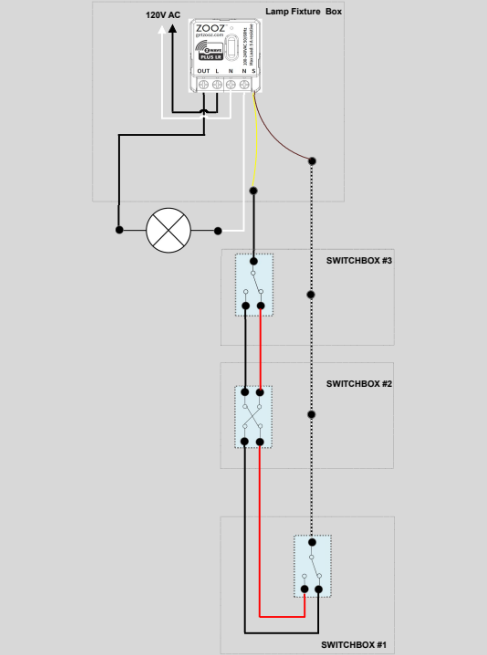
The ZEN57 is a compact relay that adds Z-Wave on/off control to your existing lighting setup without replacing your switches. You can install the ZEN57 behind the switch or at the fixture box.
Please note that there are only two supported installation methods for the ZEN57:
-
Line and load located in the same electrical box, or
-
Installation directly inside the light fixture box
The ZEN57 will not work if the line and load are located in separate boxes.
It is also very important to remember that no line voltage may be connected to the dry contact inputs on the ZEN57. In 3-way or 4-way installations, the connected mechanical switches must operate strictly as dry contact inputs only.
There is no need to configure advanced parameters for a standard installation. By default, Auto Input Detection (Parameter 5 = Value 0) will automatically detect whether a mechanical toggle switch (Parameter 5 = Value 3) or a momentary switch (Parameter 5 = Value 2) is being used.
Optionally, Parameter 5 can be manually set to Value 1 (Toggle Switch Mode), where the output state changes each time the switch is toggled.
If you're unsure about the wiring process or are unable to match your wiring with the provided diagrams, please don't attempt the installation. Take images of your installation before you begin (click here for instructions to get it right the first time) and get in touch with our team if you have any questions or experience any issues so we can help you complete the wiring safely.
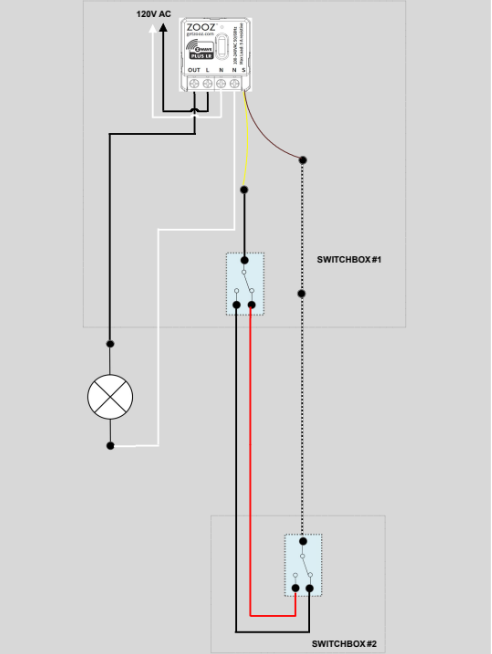
3-Way Load and Line in Same Box
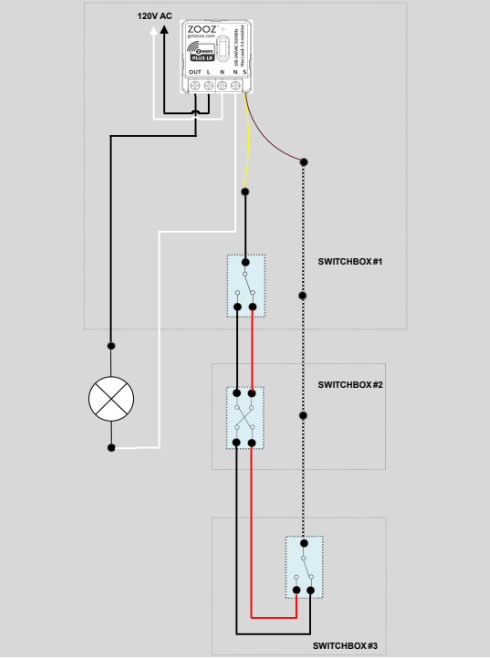
4-Way Load and Line in Same Box
3-Way or 4-Way In the Fixture Box